🎯 What You'll Learn
In this comprehensive guide, you'll discover proven strategies to boost your home Wi-Fi coverage, eliminate frustrating dead spots, and choose the perfect router or mesh system for your needs. Whether you're a senior staying connected with family, a family with multiple devices, or a remote worker, this guide will help you achieve reliable, fast internet throughout your entire home.
In today's connected world, a strong and reliable Wi-Fi signal isn't a luxury; it's a necessity. Whether you're a senior trying to stay connected with loved ones, a family with multiple devices streaming, gaming, and learning, or a remote worker depending on a stable connection for your livelihood, buffering and dead zones are incredibly frustrating.
This detailed guide will walk you through the essential steps to optimize your home Wi-Fi, banish those frustrating dead spots, and help you select the perfect hardware solution, whether it's a new router or a mesh Wi-Fi system. We'll back it all up with real-world examples and data from reputable sources to ensure you get the best advice.
📡 Understanding Your Current Wi-Fi Landscape
The Culprits: What's Hurting Your Wi-Fi?
- Distance: The further you are from your router, the weaker the signal.
- Obstacles: Walls (especially brick, concrete), floors, large appliances, and metal can absorb or block Wi-Fi signals.
- Interference: Other electronic devices (cordless phones, microwaves) and neighboring Wi-Fi networks cause congestion.
- Outdated Equipment: An old router might lack modern Wi-Fi standards (like Wi-Fi 5 or Wi-Fi 6).
- Poor Placement: The location of your router is perhaps the most critical factor.
⚡ Key Steps to Boosting Your Wi-Fi Coverage
1 Optimal Router Placement: The Golden Rule
This is often the simplest yet most effective fix.
- Central Location: Place your router in the most central location in your home.
- High and Unobstructed: Place your router on a shelf or desk, not on the floor or hidden behind furniture.
- Avoid Obstructions: Keep it away from large metal objects and major appliances.
Optimal Router Placement: The Golden Rule - Central and High Maximizes Coverage
2 Update Your Router's Firmware
Router manufacturers frequently release firmware updates that improve performance, add features, and patch security vulnerabilities. Log into your router's admin interface to check for and install updates.
3 Optimize Your Wi-Fi Channels
Wi-Fi channels can get congested. The 2.4 GHz Band offers greater range but is slower and more prone to interference (use non-overlapping channels 1, 6, or 11). The 5 GHz Band is faster with less interference but has a shorter range.
Tools for Analysis: Use Wi-Fi Analyzer Apps (e.g., "WiFi Analyzer" on Android) to see which channels are least congested in your area.
Optimize Your Wi-Fi Channels: Avoid Congestion for Faster, Stable Wi-Fi
4 Manage Bandwidth: Prioritize What Matters
If your network is struggling with multiple streams, use Quality of Service (QoS) settings on your router to prioritize essential traffic, such as your work laptop's video calls or a gaming console.
Manage Bandwidth: Quality of Service (QoS) Settings Allow You to Control What's Fastest
🔧 Fixing Dead Spots: Beyond Basic Optimization
5 Consider a Wired Backhaul (Ethernet) or Powerline Adapters
For critical devices or stubborn dead zones, a physical connection is best. Run an Ethernet cable or use Powerline adapters. These devices use your home's existing electrical wiring to extend your network, providing an Ethernet port and often a Wi-Fi hotspot in a remote location.

Fixing Dead Spots: Wired is Always Faster & More Reliable
🛒 Choosing the Right Mesh or Router Solution
When to Upgrade Your Router
If your router is older than 3-4 years, consider upgrading to a modern model supporting Wi-Fi 6 (802.11ax) or Wi-Fi 6E. These standards offer faster speeds and better efficiency for multiple devices in small to medium-sized homes (up to 2000 sq ft).
When to Invest in a Mesh Wi-Fi System
For larger homes (over 2000 sq ft), multi-story homes, or complex layouts, a mesh Wi-Fi system is the ultimate solution. These systems use multiple "nodes" to create a single, seamless network, ensuring whole-home coverage and eliminating dead spots effectively.
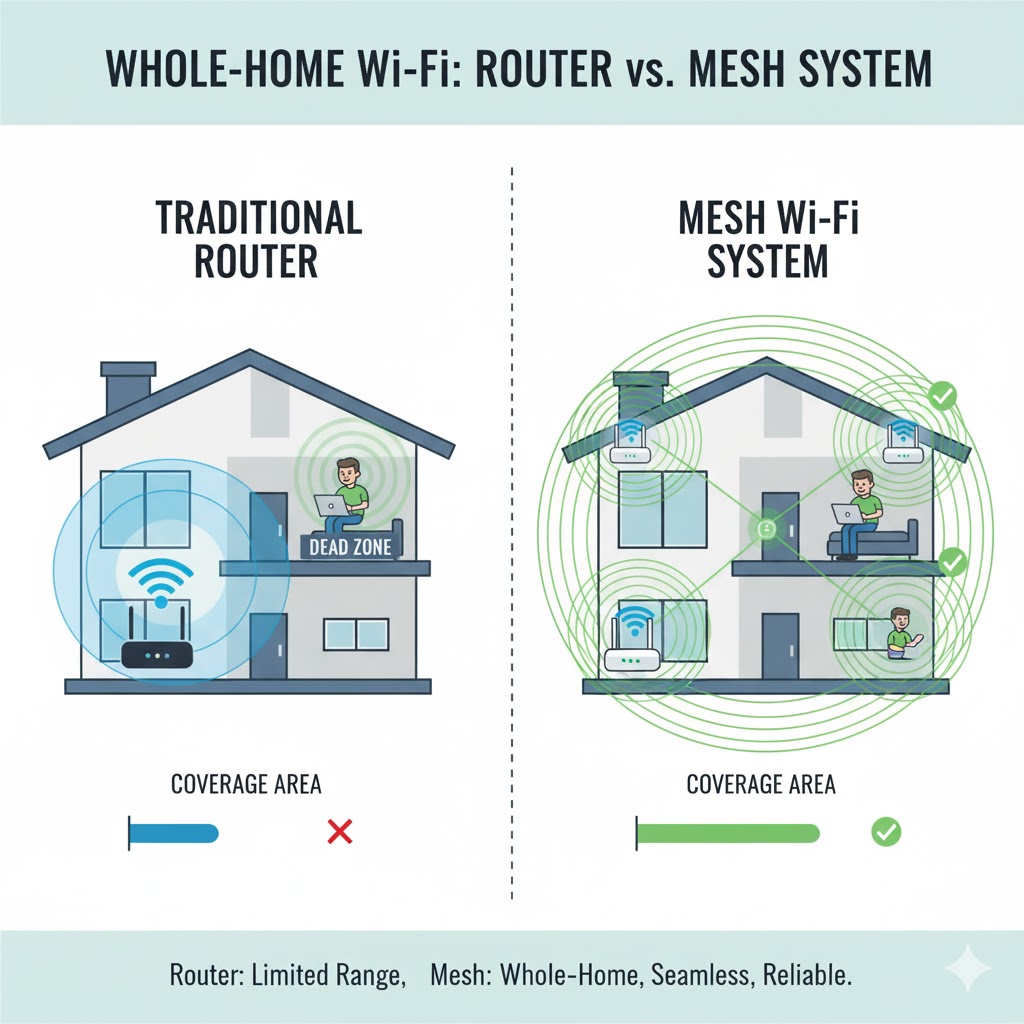
Mesh Wi-Fi System vs. Traditional Router: Mesh provides Whole-Home Stability and Eliminates Dead Spots
Wi-Fi 6E: Faster Speeds, Less Interference, More Capacity
💡 Final Thoughts and Pro Tips
- Regular Reboots: Restart your router occasionally to resolve minor glitches.
- Secure Your Network: Always use WPA2 or WPA3 encryption with a strong password.
- Consider a Guest Network: Keep your main network secure and less congested by setting up a separate network for visitors.
- Check Your Internet Speed: Don't confuse slow Wi-Fi with slow internet from your provider; test your speed via a wired connection first.
🎯 Blog Post Summary
Boosting your home Wi-Fi involves a combination of smart optimization and, if necessary, strategic hardware upgrades.
- Start with the basics: Optimize router placement (central, high) and update firmware.
- Fine-tune your network: Use analyzer tools to find the least congested channels and utilize QoS settings to prioritize important traffic.
- Address stubborn dead spots: Use wired Ethernet or Powerline adapters.
- Upgrade intelligently: Choose a Wi-Fi 6/6E router for smaller homes.
- Embrace Mesh Wi-Fi for larger homes: Use a multi-node mesh system for the most robust, whole-home coverage.
By following these steps, you can transform your home Wi-Fi into a powerful, reliable network that seamlessly supports everyone in your household.
🎓 Conclusion
Congratulations! You now have a comprehensive understanding of how to supercharge your home Wi-Fi network. From basic optimization techniques to advanced mesh systems, these strategies will help you eliminate dead spots and achieve reliable, fast internet throughout your entire home.
Ready to Upgrade Your Wi-Fi?
Contact Hjaltland Cyber Management for expert WiFi setup and optimization services!